
☰
All servicesLocal SEOGBP managementAEO | GEOSEO contentTechnical SEOLink buildingDesign & CROPPC managementIndustriesLaw firmsHome servicesPlumbersHVACElectriciansRoofersMedical practicesOrthopedicsPhysical therapyDental practicesGeneral dentistsOrthodontistsPeriodontistsEndodontistsRestaurants and coffee shopsTour operatorsAuto repair shopsLocationsPennsylvaniaState CollegeBellefonteAltoonaWilliamsportLock HavenLewistownPhiladelphiaPittsburghAllentownHarrisburgNew YorkNew York CityBuffaloRochesterAlbanyTexasHoustonDallasSan AntonioAustinUtahSalt Lake CityProvoSt. GeorgeConnecticutBridgeportNew HavenHartfordStamfordOhioColumbusClevelandCincinnatiWashingtonSeattleSpokaneTacomaNevadaLas VegasRenoHendersonPackagesAboutResourcesArticles
Home / Digital marketing / Website build
Website builds with the SEO foundation done first
Quick summary: A website build from Galli Local is a new or rebuilt WordPress site for a small business, planned around search before any design starts. The URL plan, schema, speed targets, tracking and redirects are part of the build, so the site can rank and count leads on the day it launches. Each build is quoted per project, and you own the site, the domain and every account.
What is different about an SEO-first build?
The order. Most sites are designed first, and search is handled after launch by whoever is hired next. That is when the common problems get baked in: service pages merged into one, old URLs dropped without redirects, a hero photo that takes seconds to load on a phone, and forms nobody is tracking.
In an SEO-first build, the page list and the URL plan are settled before a designer opens a file. Design then works inside that plan.
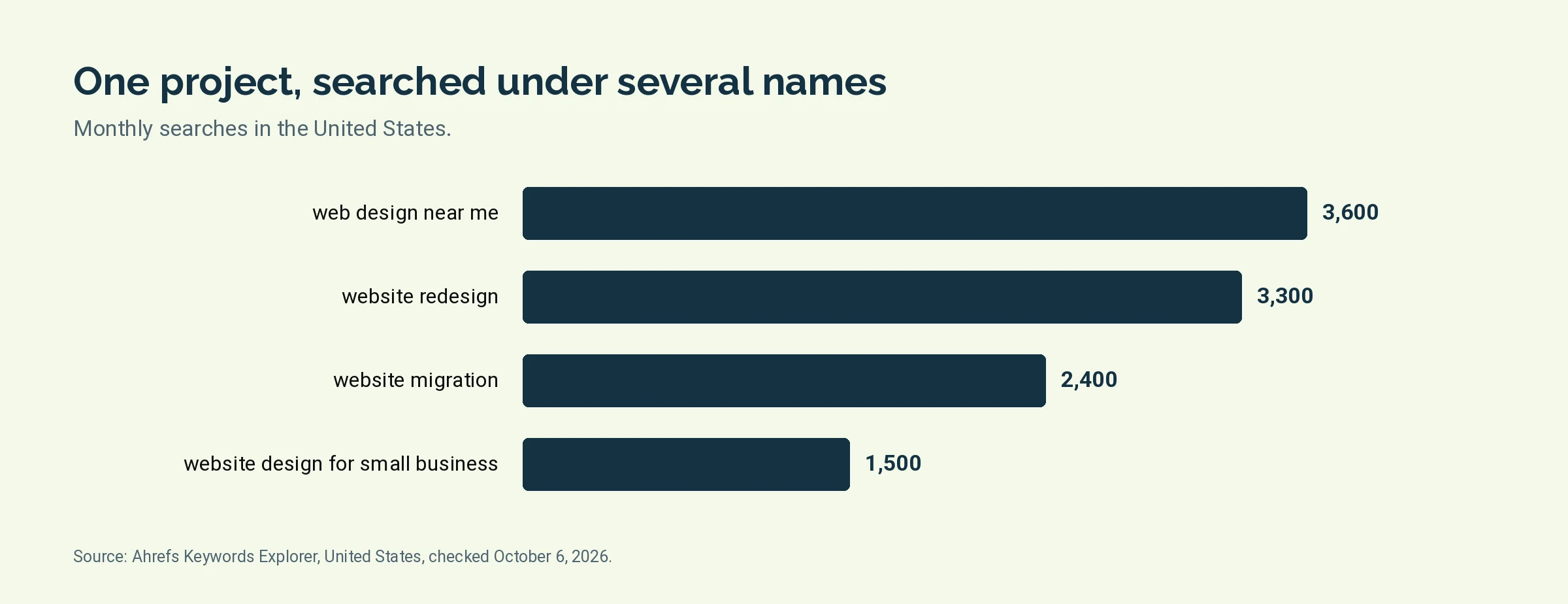
Owners look for this work under several names. Ahrefs Keywords Explorer shows about 3,600 searches a month in the United States for "web design near me", about 3,300 for "website redesign", about 2,400 for "website migration" and about 1,500 for "website design for small business". A redesign and a migration are the same project seen from two sides: one is about how the site looks, the other is about what happens to the rankings the old site earned.
What is included in a website build?
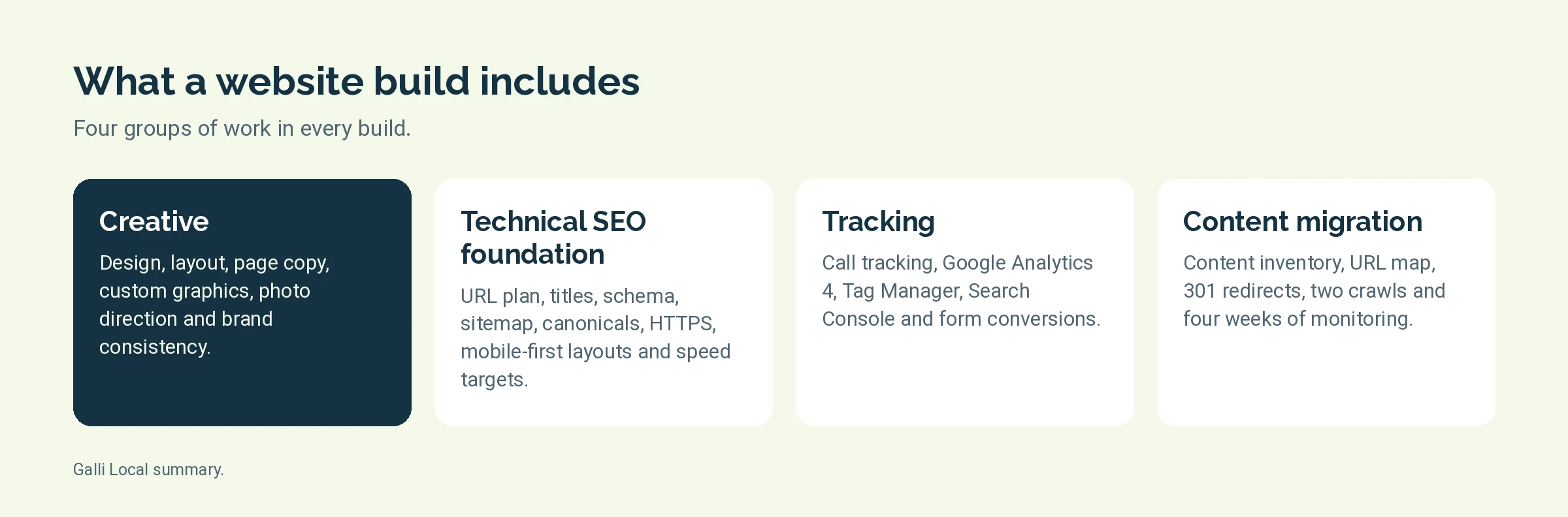
Four groups of work. Every build includes all four.
Creative
- Design and layout for each page type: home, service, area, about and contact
- Page copy, written from your answers about real jobs and approved by you
- Custom graphics in place of generic stock images
- Photo direction: a shot list for your own team, building and work
- Brand consistency: the same colors, type and logo use on every page
Technical SEO foundation
- Site structure and a URL plan, with one page per service and per location
- A title tag, a meta description and one H1 on every page
- Internal linking between services, areas and the pages that bring in calls
- LocalBusiness, Service, FAQ and Breadcrumb schema
- An XML sitemap and robots rules that match the site
- Canonical tags, so one version of each page is indexed
- HTTPS on every page
- Mobile-first layouts, designed for a phone screen before a desktop one
- Image compression
- Core Web Vitals targets, listed in the table below
- Accessibility basics: text contrast, alt text, labeled form fields and keyboard access
- Name, address and phone matched to your Google Business Profile, character for character
Google's web.dev documentation sets three thresholds for a good page experience, measured at the 75th percentile of page loads. We build to them.
Tracking
- Call tracking, set up so the number search engines read on the page does not change
- Google Analytics 4
- Google Tag Manager
- Google Search Console, verified and with the sitemap submitted
- Form and booking conversions, each recorded by source
- Spam-protected forms with a link to your privacy policy
Content migration
- A content inventory of the old site: every page, its traffic and its links
- An old-to-new URL map
- 301 redirects from each old URL to its closest new page
- A crawl of the staging site before launch
- A crawl of the live site after launch
- Four weeks of monitoring after launch
What do you get at launch?
A site you can log in to, and a short set of documents that prove the work was done.
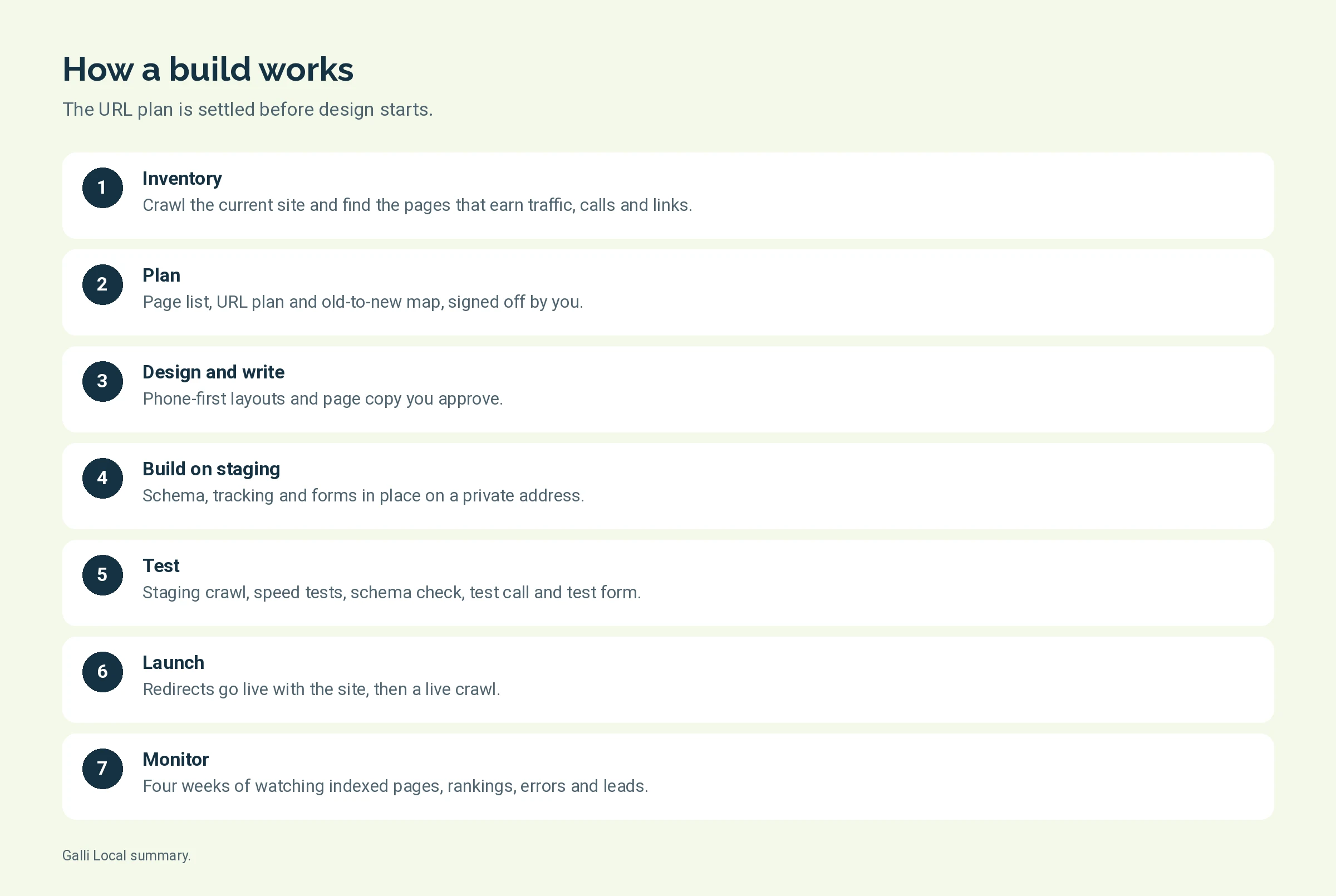
How does a build work, step by step?
- Inventory. We crawl the current site and pull Search Console data to see which pages earn traffic, calls and links. Those pages are protected.
- Plan. The page list, URL plan and old-to-new map are written and sent to you for sign-off.
- Design. Layouts are drawn for a phone first, then for a desktop. You see one page type before the rest are built.
- Write. Page copy is drafted from your answers, edited and fact-checked by a person, and approved by you.
- Build on staging. The site is assembled on a private staging address with schema, tracking and forms in place.
- Test. A full crawl of staging, speed tests, a schema check, a test call and a test form.
- Launch. Redirects go live with the site. The live site is crawled the same day.
- Monitor. Indexed pages, rankings, errors and leads are watched for four weeks, and problems are fixed as they appear.
How long a build takes depends on the number of pages and how fast copy and photos are approved. You get a schedule with the quote.
Which platform do we build on?
WordPress, with the Elementor page builder. Both are listed with our tools on the about page, next to Rank Math for titles, schema, redirects and sitemaps.
The reason is ownership. WordPress runs on any standard host, your staff can edit a page without a developer, and another agency can take the site over if we part ways. A site on a builder only one company can log in to is a site you rent.
If the current site is already on WordPress and the platform is sound, a rebuild can keep the hosting, the domain and much of the content. If it is on another platform, the first step shows whether a move is worth it.
Who owns the site?
You do. The site, the domain and the accounts stay in your name.
- Domain: registered in your account. If it is in a past vendor's name, moving it is part of the project.
- Hosting: in your account, paid by you to the host.
- Analytics, Tag Manager and Search Console: created in your Google account, with access shared to us.
- Content and graphics: yours to keep.
Hosting and paid plugins are passed through at cost. We tell you what each one is before it is bought.
How does this connect to technical SEO and design and CRO?
A build does both jobs once, on a whole site. The two service pages cover the ongoing versions.
- Technical SEO is the audit and repair of a site you are keeping. That page says we rebuild when patching is not worth it. This is that rebuild.
- Design and CRO changes a handful of high-traffic pages and measures calls over 90 days. After a build, the same measurement starts from the new baseline.
A build is also where SEO content pays off fastest, since missing service and area pages can be written into the new structure. For a business that wants every part run together, see SEO services. Pricing for the monthly packages is on the packages page.
Do you need a new site at all?
Usually not. Most local sites need repairs, not a rebuild.
We show you which one the numbers support before quoting either.
Common questions about website builds
Will a new site hurt our rankings?
It can, if URLs change without redirects. Skipping the URL map is the most common reason a new site ranks worse than the old one. Every build here includes an old-to-new URL map, redirect testing, a crawl before and after launch, and four weeks of monitoring. No one can promise that rankings will not move during a change.
Can you rebuild on our current platform?
Yes, if it is WordPress. That is the platform we build on. We audit sites on Squarespace, Wix, Webflow and Shopify, where some fixes are limited by the platform, and we will say so when a move to WordPress is the better choice.
How much does a website build cost?
It is quoted per project. The quote depends on the number of pages, how much copy has to be written, and how many old URLs have to be mapped. Hosting and paid plugins are passed through at cost on top of the quote.
Who writes the page copy?
We do, with your input. You answer a few questions about real jobs and what sets the business apart. AI helps with research and first drafts, a person edits and fact-checks every page, and nothing goes live until you approve it.
What do you need from us?
Access to the current site, the domain registrar, hosting and your Google accounts. We also need your real photos, your logo files and your answers to the copy questions. Slow approvals are the usual cause of a late launch.
What happens after launch?
We monitor the site for four weeks: indexed pages, rankings, crawl errors and leads. After that the site is yours to run. Ongoing care is available through the monthly packages or as quoted work.